Using the AmneziaWG Protocol on Self-hosted Servers
This guide is for users who want to migrate from AmneziaWG 2.0 to AmneziaWG 3.1.
We recommend migrating to AmneziaWG 3.1 regardless of how reliably your AmneziaWG 2.0 connection currently works. This is because AmneziaWG 2.0, like AmneziaWG 1.5, has become vulnerable to blocking.
AmneziaWG 2.0 and 3.1 use the same container, so both versions cannot be installed on the same server at the same time through the AmneziaVPN app.
To migrate to AmneziaWG 3.1, you need to remove AmneziaWG 2.0 and reinstall the protocol using AmneziaVPN 5.0.2.1 or later. This app version automatically applies updated protocol settings designed to improve connectivity under blocking.
If AmneziaWG is not installed on your server yet, follow the standard guide: Install VPN on Your Server.
To upgrade the protocol, first remove AmneziaWG 2.0 from the server. This will also remove all users created for the protocol, and their connections will stop working. After installing AmneziaWG 3.1, you will need to create the users again and issue new connection keys or configuration files.
- Update AmneziaVPN to 5.0.2.1 or later from the downloads page (mirror).
- Open the AmneziaVPN app and click any connection name.
- Click ⚙️ (gear icon) to the right of your server connection.
- On the Protocols tab, select AmneziaWG.
- In the protocol settings, click Remove.
- Return to the protocol list and click the 📥 icon next to AmneziaWG.
- Enter an available port below
9999, for example585or1234, and click Install. Make sure the selected port is not already used by another service on the server.
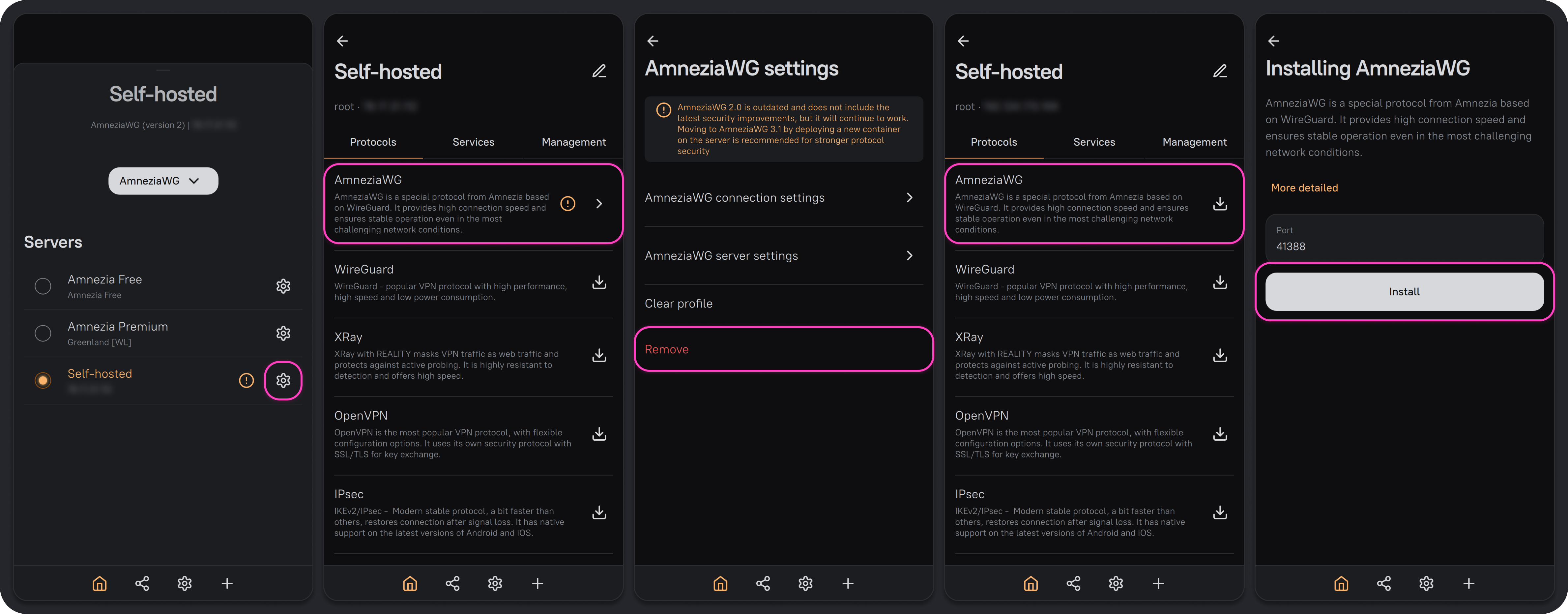
After installation, the server will be running AmneziaWG 3.1. You can now create users and share guest access.
If you create a guest connection using AmneziaWG 3.1 in AmneziaVPN versions earlier than 5.0.1.5, it will not work — Not installed will appear under the connection name.
If you create a full-access server connection in an older version of AmneziaVPN, the installed AmneziaWG 3.1 protocol will not be shown.