sc create AmneziaVPN-service error on Windows
When installing or updating AmneziaVPN on Windows, the installer may show an error like this:
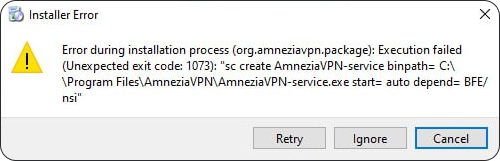
The exit code may differ, for example 1072 or 1073.
This error means that the installer could not stop or replace the existing AmneziaVPN-service.
What to do:
-
In the error window, click Ignore.
-
If the installer continues, wait for the process to finish. If AmneziaVPN opens automatically after that, close the app.
-
Restart your PC through Start → Power → Restart.
Use Restart, not Shut down followed by turning the PC back on. When shutting down, Windows may keep part of the system state for Fast Startup, so a stuck service may not always be reset.
-
After Windows starts again, do not open AmneziaVPN.
-
Run the same
.exeinstaller file again. -
Complete the installation. The
AmneziaVPN-serviceerror should no longer appear.
If the error appears again after restarting Windows and running the installer a second time, email us at [email protected] or ask for help in our Telegram community. Include a screenshot of the error and the full text of the installer message, including the exit code.