Converting an AmneziaWG 1.0 Configuration File to 1.5

Overview

If you have a .conf configuration file for the AmneziaWG 1.0 protocol and want to improve your connection's resistance to blocking, you can manually convert it to the AmneziaWG 1.5 format. All it takes is adding the I1 parameter — a traffic masking packet.

The key difference between AmneziaWG 1.5 and 1.0 is the I1-I5 parameters, which allow VPN traffic to be disguised as popular network protocols (such as QUIC). This makes it harder for DPI systems to detect and block VPN connections.

For the conversion described in this guide, it is sufficient to add only the I1 parameter.

What an AmneziaWG 1.0 configuration file looks like

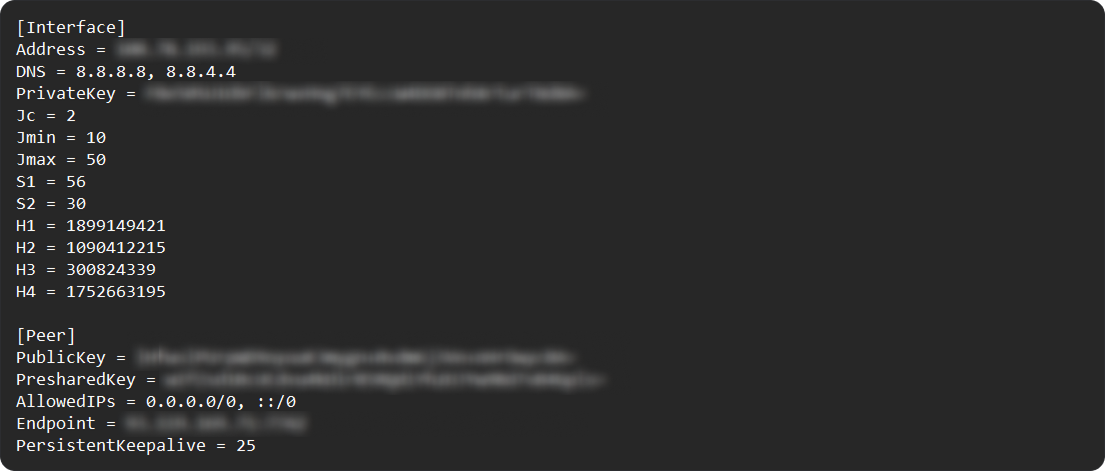
An AmneziaWG 1.0 configuration file contains an [Interface] section with obfuscation parameters Jc, Jmin, Jmax, S1, S2, H1-H4, and a [Peer] section with connection parameters.
How to convert an AmneziaWG 1.0 configuration file to 1.5

  1. Open the .conf configuration file in any text editor.

  2. Find the H4 parameter line in the [Interface] section.

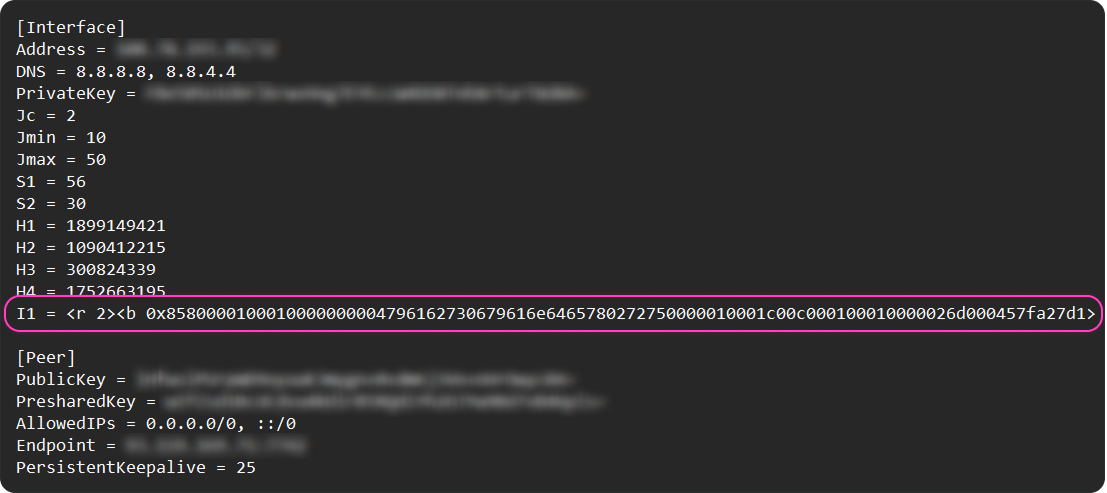
  3. Right after the H4 line, add a new line with the I1 parameter — copy and paste it as a single line, without line breaks or extra wrapping:

    I1 = <b 0xc70000000108ce1bf31eec7d93360000449e227e4596ed7f75c4d35ce31880b4133107c822c6355b51f0d7c1bba96d5c210a48aca01885fed0871cfc37d59137d73b506dc013bb4a13c060ca5b04b7ae215af71e37d6e8ff1db235f9fe0c25cb8b492471054a7c8d0d6077d430d07f6e87a8699287f6e69f54263c7334a8e144a29851429bf2e350e519445172d36953e96085110ce1fb641e5efad42c0feb4711ece959b72cc4d6f3c1e83251adb572b921534f6ac4b10927167f41fe50040a75acef62f45bded67c0b45b9d655ce374589cad6f568b8475b2e8921ff98628f86ff2eb5bcce6f3ddb7dc89e37c5b5e78ddc8d93a58896e530b5f9f1448ab3b7a1d1f24a63bf981634f6183a21af310ffa52e9ddf5521561760288669de01a5f2f1a4f922e68d0592026bbe4329b654d4f5d6ace4f6a23b8560b720a5350691c0037b10acfac9726add44e7d3e880ee6f3b0d6429ff33655c297fee786bb5ac032e48d2062cd45e305e6d8d8b82bfbf0fdbc5ec09943d1ad02b0b5868ac4b24bb10255196be883562c35a713002014016b8cc5224768b3d330016cf8ed9300fe6bf39b4b19b3667cddc6e7c7ebe4437a58862606a2a66bd4184b09ab9d2cd3d3faed4d2ab71dd821422a9540c4c5fa2a9b2e6693d411a22854a8e541ed930796521f03a54254074bc4c5bca152a1723260e7d70a24d49720acc544b41359cfc252385bda7de7d05878ac0ea0343c77715e145160e6562161dfe2024846dfda3ce99068817a2418e66e4f37dea40a21251c8a034f83145071d93baadf050ca0f95dc9ce2338fb082d64fbc8faba905cec66e65c0e1f9b003c32c943381282d4ab09bef9b6813ff3ff5118623d2617867e25f0601df583c3ac51bc6303f79e68d8f8de4b8363ec9c7728b3ec5fcd5274edfca2a42f2727aa223c557afb33f5bea4f64aeb252c0150ed734d4d8eccb257824e8e090f65029a3a042a51e5cc8767408ae07d55da8507e4d009ae72c47ddb138df3cab6cc023df2532f88fb5a4c4bd917fafde0f3134be09231c389c70bc55cb95a779615e8e0a76a2b4d943aabfde0e394c985c0cb0376930f92c5b6998ef49ff4a13652b787503f55c4e3d8eebd6e1bc6db3a6d405d8405bd7a8db7cefc64d16e0d105a468f3d33d29e5744a24c4ac43ce0eb1bf6b559aed520b91108cda2de6e2c4f14bc4f4dc58712580e07d217c8cca1aaf7ac04bab3e7b1008b966f1ed4fba3fd93a0a9d3a27127e7aa587fbcc60d548300146bdc126982a58ff5342fc41a43f83a3d2722a26645bc961894e339b953e78ab395ff2fb854247ad06d446cc2944a1aefb90573115dc198f5c1efbc22bc6d7a74e41e666a643d5f85f57fde81b87ceff95353d22ae8bab11684180dd142642894d8dc34e402f802c2fd4a73508ca99124e428d67437c871dd96e506ffc39c0fc401f666b437adca41fd563cbcfd0fa22fbbf8112979c4e677fb533d981745cceed0fe96da6cc0593c430bbb71bcbf924f70b4547b0bb4d41c94a09a9ef1147935a5c75bb2f721fbd24ea6a9f5c9331187490ffa6d4e34e6bb30c2c54a0344724f01088fb2751a486f425362741664efb287bce66c4a544c96fa8b124d3c6b9eaca170c0b530799a6e878a57f402eb0016cf2689d55c76b2a91285e2273763f3afc5bc9398273f5338a06d>
  4. Save the file.

The conversion is complete — the configuration file now matches the AmneziaWG 1.5 format and can be used to create a connection.

After editing, the configuration file should look like this:
Contact the chat for help if something does not work